One Knob to Rule Them All

When it comes to digital keyboards, increased portability almost always means less direct control over program parameters, which necessarily take second priority to performance controls. Even with heftier workstation synths, the sheer number of features and options makes it impossible to dedicate physical controls for everything.

The compromise for packing a ton of functionality into a tidy little package usually comes in the form of a tiny LED screen and an intricate array of menus and submenus, all controlled by a “data knob”, and maybe a couple of buttons. Creating new presets means twisting and tapping through dozens (or hundreds) of menu options. Crafting the perfect sound can be a frustrating exercise lasting hours, or even days.

miniak_featured

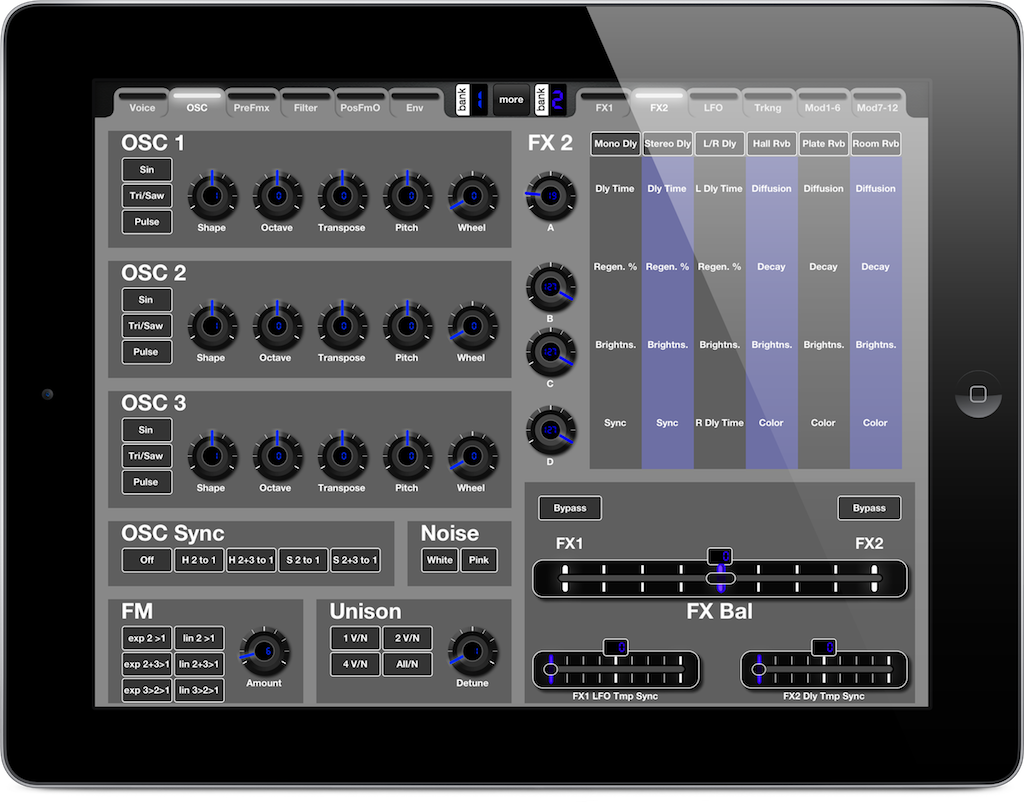
MIDI Designer Pro takes a lot of the pain and frustration out of digital synth programming by giving you the controls you need, allowing you to discover the sounds hidden behind those layers of menus. A great example is the control layout created by André Noller for the Akai Miniak (pictured above).

As many know, this synth was nearly un-editable (at least for me) because of the missing controllers and the ‘calculator-styled’ display with one (!) endless knob and a few shortcuts to get to the menus faster (but not fast enough if you ask me).

As you can see from just one of the many screens included in the layout, André’s custom controller offers a massive improvement in the programming workflow for this synth. The good news is, layouts like this are possible for most modern digital synths, and many have already been created and shared by members of the MIDI Designer community.

So save yourself some scrolling and tapping by heading over to the community shares, where you may just find a ready-to-use layout for your synth.

Dream Bigger

freightliner_projection1_2015-1280x886

Freightliner, maker of big trucks, went as big as it gets with a media event in May by using advanced projection mapping to turn Hoover Dam into one big projection screen. It took 60 high-powered projectors to cover the surface of the dam, which spans the area of about 9 football fields.

What does this have to do with MIDI Designer? Nothing directly, but when Dan shared it with me, it got me to thinking about dreaming bigger.

First, though, I’ll introduce myself for those of you who may not know me. My name is Clif Johnston, and I’m the founder/president of Apptronica, and author of a couple of . I’ll be doing a bit of guest posting here on the MD blog to share some thoughts on using the iPad as a control interface using MIDI Designer Pro.

My main focus in life is making music on iOS devices. A few days ago someone asked why anyone would want to use an app like MIDI Designer to control other apps – why wouldn’t you just use an app’s existing controls? The answer lies in dreaming bigger: control more; control better; control differently.

Control More

Layouts for two Source Audio Pedals, the Manta Bass Filter and the Bass OFD

Custom control interfaces are helpful, and even necessary sometimes, if you’re using multiple apps, VST synths, hardware synths, or a combination of those. Beyond just having all of the necessary knobs and sliders within reach, combining controls into a single interface opens up interesting options for controlling multiple parameters across your setup at the exact same time.

For example, you might set up a single X/Y control to adjust the filter cutoff and resonance on 2 synths at once. You could also use a single set of program change controls to move seamlessly through a live set without trying to navigate a list of preset changes in the middle of a performance.

Control Better

Animoog for iPhone

Animoog for iPhone

If you’re using music apps on an iPhone or iPad mini, the controls can be so dense sometimes that they’re next to useless for live performance. This applies to software VSTs as well, especially when you’re running half a dozen at the same time. Creating your own control layouts allows you to enlarge and expand certain controls while removing those you don’t use.

The precision of controls can be improved using many of MIDI Designer’s features. For example, you can reduce the number of ticks on a knob, which in turn reduces the number of discrete values to be sent. This can be handy if you’re only interested in fractional increments (e.g. 1/4, 1/2, 3/4, 4/4), making setting the desired values much easier.

There’s also a “Long Throw” option for sliders, knobs, and crossfaders which slows the movement of the controls, leading to smoother and more precise parameter changes. This is especially handy for things like volume or tempo where a quick change can lead to very undesirable results.

Control Differently

iPulsaret Performance Layout

You may find that a slider or X/Y control provides a better interface for you than the set of knobs provided by the developer. Perhaps a row of buttons with discrete values better fits your needs than a single continuous control.

MIDI Designer also allows you to create custom keyboards, opening up some interesting options not readily available in some apps or software. You could create a keyboard that operates vertically instead of horizontally. You could set up a keyboard to restrict notes to a certain scale. You can even use hex shaped buttons to create your own isomorphic keyboard layouts.

What’s Your Dream?

This is just a quick example of a handful of ways to use MIDI Designer layouts to improve your workflow or live performance setup. There are tons of possibilities, but it’s really the ability to create personalized layouts that do exactly what you need them to do that makes MIDI Designer such a valuable tool.

Let me know in the comments what you’d like to be able to do with a custom controller. If you’re already using MIDI Designer in an innovative way, please share so that your ideas can inspire others.


MIDI Designer Controls Jaws Piano!

I spoke with Craig Knudsen — MIDI Designer Core Test team member and Top Yamaha Consultant — about the amazing video he made with Tony DeSare and Robbie Vicencio.

…[we’re using] a YAMAHA Disklavier and an EZ-220 for the underwater shot! Just in time for the 40th Anniversary of JAWS release on June 20th, 1975.

I used MIDI Designer Pro (MDP) to enter the aftertouch codes to hold the Disklavier keys into special positions to create the “teeth” on this 88-toothed shark. Tony played the piano and I created these “animations” around his playing, bringing this shark piano to life.

With MDP I was able to create the special After Touch codes and test them out wirelessly, and see what they looked like. This was connected via a Quicco Sound MIDI device to turn the Disklavier into a wireless receiver to test the patterns. Then, using an iConnectivity midi4+ model, I isolated Tony’s MIDI performance data and switched between the two.

Disklavier Key Animations by Craig Knudsen using MIDI Designer Pro!

MDP was literally the only app I found to send these unpublished MIDI codes wirelessly to the piano during development.

Disklavier Layout for Jaws Piano in MIDI Designer

Disklavier Layout for Jaws Piano in MIDI Designer (Left Side)

Tony and Robbie used several LCD projectors to broadcast the video directly on the piano. By the way, for the piano arrangement, Tony created all the sounds using the acoustic piano… or rather all the sound effects

I’m really grateful for the shoutout, and very excited to be collaborating with such high-caliber artists. For more information:

Craig on Facebook @craigaknudsen

Tony on Facebook @tonydesare

Robbie on Facebook @robbievicencio

MIDI Designer on Apple Homepage

On August 11, 2014, fans of MIDI Designer got in touch to let us know that they had seen the App on TV. In Barcelona! In Singapore! On the Discovery Channel! In the New York Times!

Apple featured MIDI Designer on the apple.com homepage from August 11 to Sept 10, 2014, in the hands of Luke Wang of Yaoband.

MIDI Designer on Apple.com Homgepage

The landing page mention linked to a Your Verse focus on Yaoband and their use of the iPad in music-making. We’re extremely grateful to Yaboand and our users all around the World, Apple for highlighting us in this story, and for the excellent apps that keep us company in the ad:

  • Akai iMPC (link)
  • Propellerhead Software Figure (link)
  • Native Instruments iMaschine (link)
  • Music Studio (link)

Check out the full Your Verse feature!
Article on Apple Insider

About MIDI Designer
MIDI Designer is the most advanced professional MIDI controller platform. Since its launch in the Apple App Store in 2012, the award-winning app has been lauded by Music Industry publications including Sonic Touch, Recording Magazine, Sound on Sound and DJ Tech Tools. It’s been used on stage and in the studio by well-known musicians, music producers and DJs around the World, including Todd Rundgren, POSTYR Project and Shadow Child. More recently, MIDI Designer has taken part in the production of Network TV series and sporting events.

Hundreds of thousands of users trust MIDI Designer as their go-to MIDI controller, and the App is the motor for an active and growing community which shares layouts for popular MIDI hardware and software from Casio, Korg, Roland and many more. MIDI Designer has also been chosen by Antares and Casio as their iOS MIDI controller for select hardware. The App is available on the App Store for iPad and iPhone in Chinese, English, French, Italian, Japanese and Spanish.

dream | create | play

Apple, what have you done!?

Introduction of Swift
On June 2, 2014, Apple announced a new programming language, Swift.

This is exciting news from a developer perspective. It means we’ll be able to add new features and functionality faster. In addition, new code will more bug-free and flexible going forward.

Obsolete Devices
Swift will only be supported from iOS 7 onwards. This means that you’ll have to upgrade to an iPhone 4S or better, an iPod touch 5G or better, or an iPad 2 or better.

iPad 1 users and others running iOS 5 and iOS 6 will continue to have unrestricted access to MIDI Designer 1.6, the most powerful MIDI controller for iOS.

Onwards, Upwards
This is a very exciting period for software development on iOS, and we’re looking forward to sharing what we’re able to do in Swift in Version 1.8 of MIDI Designer Pro*.


* MIDI Designer Lite and MIDI Designer 12 will continue to be updated for existing users.

MIDI Designer Lite on Vacation

Note from 2014-10-07: MIDI Designer Lite is back!


MIDI Designer Lite Icon

As of July 20, 2014, MIDI Designer Lite—the ad-supported version of the most powerful MIDI controller platform for iOS— is officially on vacation. The other light version, MIDI Designer 12, went on vacation a week earlier.

We’ve had overwhelmingly positive reviews for Lite (92% of 300 reviews are 4-stars or above). Our last review leaves off on a high note:

Last Review of Lite in Italian

Having multiple versions of the same App is confusing. Therefore, we will only be offering MIDI Designer Pro at this time.

Existing Users of MIDI Designer

MIDI Designer Lite has nearly 200,000 users who will continue to use the App, receive upgrades (simultaneously with MIDI Designer Pro), and be able to unlock to remove the Lite Bar. For existing users of Lite, your experience will not be altered in any way.

The same goes for existing users of MIDI Designer 12.

We think we’ve accommodated all of our users in this change, but you can always get in touch with us with questions, problems or encouragement.

New Users of MIDI Designer

Except by special arrangement (e.g., press inquiries, App giveaways), we will only be offering MIDI Designer Pro to new users at this time.


MIDI Designer Pro has received glowing reviews from leading industry publications (including DJ Tech Tools, Recording Magazine and Sound on Sound) and is used on stage and in the studio by professional and amateur music-makers as varied as Todd Rundgren and Shadow Child. Our first-rate Community shares layouts for top-flight gear from Roland, Yamaha, Korg, Line6 and many more.


MIDI Designer Pro

dream | create | play

Why do you force us to buy an iPad!?

MIDI Designer XW FantasyWe posted a fantasy version of our MIDI Designer XW layout on the MatrixSynth lounge the other day (link to Facebook post | link to repost on the blog).

IPAD ONLY: SO SAD!

One potential user from the Netherlands wrote, “Why always iPad only. So sad” and then, later, “I simply like multiplatform. So programmers not forcing people to use a specific device/brand. There are a lot tools which are able to output ‘any’ OS.”

WHY NOT JUST MAKE IT MULTIPLATFORM?

Here’s how you imagine the development process:
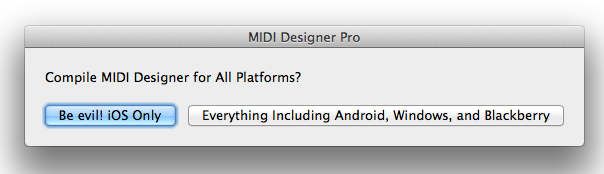
If cross-platform development were this simple

SOME HISTORY

MIDI Designer development started in 2010, about two months before the first Android tablet was released (the Samsung Galaxy). It was a sunny Summer day, and I remember taking my mountain bike to Best Buy in New Jersey where I picked up my first iPad 1.

MIDI Designer was originally written in Java (cross-platform) and called “VirtualThang” (see this article which shows images of VirtualThang in Java on OSX). The movement to iPad was gradual and development was slow as I learned Objective-C to make MIDI Designer for iPad. There were no other tabs at this time, and serious cross-platform frameworks like Titanium Appcelerator didn’t come to focus on mobile until 2012!

I was using early versions of MIDI Designer in my personal drum rig by February 2011. My brother, Mike Rosenstark, a.k.a. User #1, didn’t begin to take MD seriously until about September of 2011. That’s when he suggested I coordinate the initial launch for NAMM 2012.

CROSS-PLATFORM AT NAMM 2012?

User #1 and I headed out to NAMM 2012 expecting people to object to MIDI Designer on three grounds:

  1. MIDI Designer talks MIDI only, and doesn’t use OSC
  2. MIDI Designer doesn’t do “automap” — it’s a traditional MIDI controller
  3. MIDI Designer isn’t cross-platform

OSC vs. MIDI—On the first point, it turns out that adoption rates of OSC are not what we imagined. For smaller companies, it’s hard to find the development time and spare the cost to implement OSC. For larger companies, having hundreds of products to add OSC to is a huge cost as well. As we learned at the 30th Year Anniversary of MIDI, and continue to see every year at NAMM, <opinion>MIDI will not be supplanted by OSC any time soon.</opinion>

No Automap?!—Automap and related concepts are huge in the MIDI world. Our competitors at Touchable, LiveControl 2 (requires Lemur) and many other players use concepts that we refer to as “automap”. Automap is awesome and they seem to be doing quite well. However, there’s still a huge market for a “generic” (or “modular”) MIDI controller platform like MD, both for custom rigs and for creating “editors” for MIDI-enabled hardware and software.

No Android?!—We were shocked see ONLY iPads at NAMM 2012, and again in 2013. This year (2014), there were some Android Tablets, but excluding those that were integrated into a device, they were few and far between. Professional music manufacturers were still focusing on iOS. This will change over time, of course, but in 2014, iOS still dominates for Pro Music applications.

So what!? Make me a version for Android, now!

This Doesn’t Really Exist

MIDI Designer is written 100% in Objective-C, which means that it’s written exclusively for Apple devices. For this to change we would need to rewrite MIDI Designer, essentially from scratch, either:

  • In a cross-platform language like C++, using a cross-platform toolkit
  • For a cross-platform framework, like Titanium
  • Just make an Android version! How hard is this!?

None of these options are easy to do, and all would require a lot of development time. There are some technical difficulties to consider, relating to UI API differences, CoreMIDI/rtpMIDI availability on other platforms, and screen sizes on non-iOS devices (there are four general screen sizes for Android, and many more real sizes).

WILL WE RELEASE AN ANDROID/WINDOWS VERSION? Yes! We are confident that one or more of these three options is viable, and we’re currently exploring how best to translate the experience of MIDI Designer to other platforms. In the meantime, if you want MIDI Designer, an iPad 1 costs $99 on eBay. That’s cheaper than ANY Android tablet on the market. So there’s that…

For now, our main focus is on adding features to MIDI Designer for iOS. We’re expanding the platform that our users love and have dedicated hundreds of thousands of hours to. Will MIDI Designer be multi-platform in the future? YES!


Layout Refresh: Antares Auto-Tune Guitar

The MIDI Designer Community has been producing many great-looking and highly functional layouts over the last year. One of the Community’s most prolific authors is Chris Gretton (popup). His best-known and most-used layout by far is his JD-990 layout (which got a refresh for MIDI Designer 1.6 for all expansion packs!). He’s also worked on the Casio XW layout; his beautiful refresh came out in version 1.1 of the XW app. And he’s worked on quite a few other MIDI targets as well.

We’re very grateful to have Chris in the Community, and we are very glad to award him the Rainer Award for Design Innovation for 2014.

Chris was an instrumental force behind the design changes in MIDI Designer 1.6, and he’s used them to refresh the Antares Auto-Tune layout (for the Peavey AT-200 Auto-Tune Guitar)… Here are the results… amazing!


Before

auto-tune-1-5-1

After

auto-tune-1-6-1


Before

auto-tune-1-5-2

After

auto-tune-1-6-2


Before

auto-tune-1-5-3

After

auto-tune-1-6-3


Before

auto-tune-1-5-4

After

auto-tune-1-6-4


Before

auto-tune-1-5-6

After

auto-tune-1-6-5

Presets for Groups of Controls in MIDI Designer 1.6

New!—The manual entry on Presets!

Global (layout-wide) presets have been a part of MIDI Designer since the very beginning. In Version 1.5, we allowed you to assign global presets to buttons.

Layout-wide presets are great, but sometimes you want just a certain group of controls to snap to preset values.

This video covers all aspects of presets for groups of controls.


Some notes:

  • Channel Changers with Presets work just like Preset knobs, but they also change the channel of the subcontrol
  • Store Button Possibilities
    • No Store Button—The preset super automatically stores subcontrols’ values when the super changes values
    • Store Button Is Toggle—When the button is pressed, the preset super automatically stores subcontrols’ values when the super changes values. When the toggle is not pressed, no values are stored
    • Store Button Is Momentary—When the button is pressed, the preset super stores subcontrols’ values in the current slot
  • Recall Button Possibilities
    • No Recall Button—The preset super automatically recalls subcontrols’ values when the super changes values
    • Recall Button Is Toggle—When the button is pressed, the preset super automatically recalls subcontrols’ values when the super changes values. When the toggle is not pressed, no values are recalled
    • Recall Button Is Momentary—When the button is pressed, the preset super snaps the subcontrols to the values stored in the current slot

Note: Bug in layouts saving and mailing, see here, will be fixed in 1.6.2+.

If you’ve got questions that you think other people want to know the answers to, please ask in the Q&A forums.

If you’ve got other questions, please get in touch via Config → Actions → Email us or use the Contact Form.