MIDI Designer Lite on Vacation

Note from 2014-10-07: MIDI Designer Lite is back!


MIDI Designer Lite Icon

As of July 20, 2014, MIDI Designer Lite—the ad-supported version of the most powerful MIDI controller platform for iOS— is officially on vacation. The other light version, MIDI Designer 12, went on vacation a week earlier.

We’ve had overwhelmingly positive reviews for Lite (92% of 300 reviews are 4-stars or above). Our last review leaves off on a high note:

Last Review of Lite in Italian

Having multiple versions of the same App is confusing. Therefore, we will only be offering MIDI Designer Pro at this time.

Existing Users of MIDI Designer

MIDI Designer Lite has nearly 200,000 users who will continue to use the App, receive upgrades (simultaneously with MIDI Designer Pro), and be able to unlock to remove the Lite Bar. For existing users of Lite, your experience will not be altered in any way.

The same goes for existing users of MIDI Designer 12.

We think we’ve accommodated all of our users in this change, but you can always get in touch with us with questions, problems or encouragement.

New Users of MIDI Designer

Except by special arrangement (e.g., press inquiries, App giveaways), we will only be offering MIDI Designer Pro to new users at this time.


MIDI Designer Pro has received glowing reviews from leading industry publications (including DJ Tech Tools, Recording Magazine and Sound on Sound) and is used on stage and in the studio by professional and amateur music-makers as varied as Todd Rundgren and Shadow Child. Our first-rate Community shares layouts for top-flight gear from Roland, Yamaha, Korg, Line6 and many more.


MIDI Designer Pro

dream | create | play

Why do you force us to buy an iPad!?

MIDI Designer XW FantasyWe posted a fantasy version of our MIDI Designer XW layout on the MatrixSynth lounge the other day (link to Facebook post | link to repost on the blog).

IPAD ONLY: SO SAD!

One potential user from the Netherlands wrote, “Why always iPad only. So sad” and then, later, “I simply like multiplatform. So programmers not forcing people to use a specific device/brand. There are a lot tools which are able to output ‘any’ OS.”

WHY NOT JUST MAKE IT MULTIPLATFORM?

Here’s how you imagine the development process:
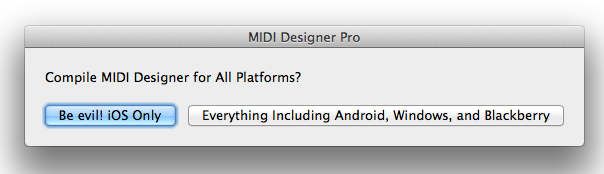
If cross-platform development were this simple

SOME HISTORY

MIDI Designer development started in 2010, about two months before the first Android tablet was released (the Samsung Galaxy). It was a sunny Summer day, and I remember taking my mountain bike to Best Buy in New Jersey where I picked up my first iPad 1.

MIDI Designer was originally written in Java (cross-platform) and called “VirtualThang” (see this article which shows images of VirtualThang in Java on OSX). The movement to iPad was gradual and development was slow as I learned Objective-C to make MIDI Designer for iPad. There were no other tabs at this time, and serious cross-platform frameworks like Titanium Appcelerator didn’t come to focus on mobile until 2012!

I was using early versions of MIDI Designer in my personal drum rig by February 2011. My brother, Mike Rosenstark, a.k.a. User #1, didn’t begin to take MD seriously until about September of 2011. That’s when he suggested I coordinate the initial launch for NAMM 2012.

CROSS-PLATFORM AT NAMM 2012?

User #1 and I headed out to NAMM 2012 expecting people to object to MIDI Designer on three grounds:

  1. MIDI Designer talks MIDI only, and doesn’t use OSC
  2. MIDI Designer doesn’t do “automap” — it’s a traditional MIDI controller
  3. MIDI Designer isn’t cross-platform

OSC vs. MIDI—On the first point, it turns out that adoption rates of OSC are not what we imagined. For smaller companies, it’s hard to find the development time and spare the cost to implement OSC. For larger companies, having hundreds of products to add OSC to is a huge cost as well. As we learned at the 30th Year Anniversary of MIDI, and continue to see every year at NAMM, <opinion>MIDI will not be supplanted by OSC any time soon.</opinion>

No Automap?!—Automap and related concepts are huge in the MIDI world. Our competitors at Touchable, LiveControl 2 (requires Lemur) and many other players use concepts that we refer to as “automap”. Automap is awesome and they seem to be doing quite well. However, there’s still a huge market for a “generic” (or “modular”) MIDI controller platform like MD, both for custom rigs and for creating “editors” for MIDI-enabled hardware and software.

No Android?!—We were shocked see ONLY iPads at NAMM 2012, and again in 2013. This year (2014), there were some Android Tablets, but excluding those that were integrated into a device, they were few and far between. Professional music manufacturers were still focusing on iOS. This will change over time, of course, but in 2014, iOS still dominates for Pro Music applications.

So what!? Make me a version for Android, now!

This Doesn’t Really Exist

MIDI Designer is written 100% in Objective-C, which means that it’s written exclusively for Apple devices. For this to change we would need to rewrite MIDI Designer, essentially from scratch, either:

  • In a cross-platform language like C++, using a cross-platform toolkit
  • For a cross-platform framework, like Titanium
  • Just make an Android version! How hard is this!?

None of these options are easy to do, and all would require a lot of development time. There are some technical difficulties to consider, relating to UI API differences, CoreMIDI/rtpMIDI availability on other platforms, and screen sizes on non-iOS devices (there are four general screen sizes for Android, and many more real sizes).

WILL WE RELEASE AN ANDROID/WINDOWS VERSION? Yes! We are confident that one or more of these three options is viable, and we’re currently exploring how best to translate the experience of MIDI Designer to other platforms. In the meantime, if you want MIDI Designer, an iPad 1 costs $99 on eBay. That’s cheaper than ANY Android tablet on the market. So there’s that…

For now, our main focus is on adding features to MIDI Designer for iOS. We’re expanding the platform that our users love and have dedicated hundreds of thousands of hours to. Will MIDI Designer be multi-platform in the future? YES!


Layout Refresh: Antares Auto-Tune Guitar

The MIDI Designer Community has been producing many great-looking and highly functional layouts over the last year. One of the Community’s most prolific authors is Chris Gretton (popup). His best-known and most-used layout by far is his JD-990 layout (which got a refresh for MIDI Designer 1.6 for all expansion packs!). He’s also worked on the Casio XW layout; his beautiful refresh came out in version 1.1 of the XW app. And he’s worked on quite a few other MIDI targets as well.

We’re very grateful to have Chris in the Community, and we are very glad to award him the Rainer Award for Design Innovation for 2014.

Chris was an instrumental force behind the design changes in MIDI Designer 1.6, and he’s used them to refresh the Antares Auto-Tune layout (for the Peavey AT-200 Auto-Tune Guitar)… Here are the results… amazing!


Before

auto-tune-1-5-1

After

auto-tune-1-6-1


Before

auto-tune-1-5-2

After

auto-tune-1-6-2


Before

auto-tune-1-5-3

After

auto-tune-1-6-3


Before

auto-tune-1-5-4

After

auto-tune-1-6-4


Before

auto-tune-1-5-6

After

auto-tune-1-6-5

Presets for Groups of Controls in MIDI Designer 1.6

New!—The manual entry on Presets!

Global (layout-wide) presets have been a part of MIDI Designer since the very beginning. In Version 1.5, we allowed you to assign global presets to buttons.

Layout-wide presets are great, but sometimes you want just a certain group of controls to snap to preset values.

This video covers all aspects of presets for groups of controls.


Some notes:

  • Channel Changers with Presets work just like Preset knobs, but they also change the channel of the subcontrol
  • Store Button Possibilities
    • No Store Button—The preset super automatically stores subcontrols’ values when the super changes values
    • Store Button Is Toggle—When the button is pressed, the preset super automatically stores subcontrols’ values when the super changes values. When the toggle is not pressed, no values are stored
    • Store Button Is Momentary—When the button is pressed, the preset super stores subcontrols’ values in the current slot
  • Recall Button Possibilities
    • No Recall Button—The preset super automatically recalls subcontrols’ values when the super changes values
    • Recall Button Is Toggle—When the button is pressed, the preset super automatically recalls subcontrols’ values when the super changes values. When the toggle is not pressed, no values are recalled
    • Recall Button Is Momentary—When the button is pressed, the preset super snaps the subcontrols to the values stored in the current slot

Note: Bug in layouts saving and mailing, see here, will be fixed in 1.6.2+.

If you’ve got questions that you think other people want to know the answers to, please ask in the Q&A forums.

If you’ve got other questions, please get in touch via Config → Actions → Email us or use the Contact Form.

Holiday Card Winter 2013-14

2013 has been a huge amount of fun. We were featured in major magazines and blogs, discovered some major artists using MIDI Designer, and got a ton of love from our users on all 7 continents in a ton of different languages. We also did two partnerships (with Casio EMI for the Casio XW and with Antares for the Peavey AT-200).

We also pushed the platform forward a lot (check the Change Log!), doing over 10 releases with major features in just one year.

And we’ve had some amazing interactions with our users. One of a small group of outstanding and consistent users is Chris Gretton, who designed the JD-990 layout for MIDI Designer and a ton of other stuff (Google “popup” and “MIDI Designer”). Chris has been very influential in the design features of just about every release, but in the weeks leading up to the holidays, he really helped us to understand what “design heads” need to get from MIDI Designer. And 1.6 responds to those needs (coming soon).

From a design perspective, however, MIDI Designer is a closed Universe. It’s hard to make a Holiday Card using MIDI Designer, for instance. This did not deter Chris, however, but he might have had to resort to a bit of “shopping” (we suspect, but you never know)… Here’s the holiday message/gag he sent us today:

With all of this new Panel stuff, shapes and custom pages, I thought I would have a go at making a top of the range, photo realistic Christmas Card. Can’t be too hard surely….

1. Make blank page

holiday-1

2. Start putting small shapes and panels on the page roughly in the shape of a (photo realistic) Christmas scene…

holiday-2

3. A few minutes later, some more random shapes and panels (and a cup of tea)

holiday-3

Tadaa! Easy job! (Don’t believe of word of the above tutorial if I were you!) 😀

Light hearted jests aside, Merry Christmas.

Thank you Chris Gretton! Then we took the final scene, branded it a bit, and make the text i8n friendly.

holiday-4

A huge heartfelt thank you and happy holidays to all of our users and potential users (all living beings, basically)… we owe you a huge debt of gratitude, and we’re moving forward with MIDI Designer as fast as we can to pay that back.

And a special thanks to all of our users that have generously dedicated their intellect and time to testing and talking about MIDI Designer. One user really can make a huge difference.

THANK YOU AND HAPPY NEW YEAR!

Which Devices Are Left Behind by iOS 7?

MIDI Designer Pro and Lite are ready for iOS 7 as of version 1.5.6 (released yesterday, September 17, 2013). Version 1.5.5 will work on iOS 7 and continue to look like it did on iOS 6. If you have any problems, please upgrade to MIDI Designer 1.5.6 and get in touch. [2014-06-03 Update Confirmed: Users experiences NO problems with our iOS 7 Upgrade]

But enough about MIDI Designer! What about iOS? Which devices get left behind?


Up to iOS 6 Only

iPhone 3GS
4th generation iPod touch


Up to iOS 5 Only

iPad
3rd generation iPod touch

Up to iOS 7 Only

iPhone 4 (not great with iOS 7, apparently)


Sources

Business Insider on iOS 8 Compatability
iOS 7 Compatibility
iOS 6 Compatibility
iOS 5 Compatibility

Introducing MIDI Designer 12: Less Is More

MIDI Designer: Universally Praised

MIDI Designer Pro and Lite have been on the App Store since January of 2012. They have gotten a lot of love from artists, engineers, hardware/software manufacturers, and the press [ check out the praise ]. But sometimes, less is more…

Embrace the Simplicity

Sometimes you need a professional MIDI controller, but with just a few controls. MIDI Designer 12 provides the same rock-solid platform, ease of use and awesome playability with just 12 controls. Embrace the simplicity.


Now available for an introductory price of $.99 in your country’s App Store.
dream | create | play

What’s the difference between Pro, Lite and 12?
[ answer ]


MIDI Designer Lite (Free)


MIDI Designer 12


MIDI Designer Pro

MIDI Designer User on the Peavey AT-200

Part 1 of 2

[Go to part 2 of 2]

We’ve been dialoging with a user about the Antares/MIDI Designer integration. As a small startup, we learn a lot from our users. Here is user Marty, educating us on the Peavey AT-200 integration.

Antares writes their instrument emulation software in three ‘packages’ … Essential Pack ($99), Pro Pack ($199) and Complete Pack ($299) … each of which features various instruments, tunings and features.

The instrument samples are truly amazing, being taken from some very expensive guitar models costing tens of thousands of dollars, each. You really have to hear the sound produced by this software’s instrument samples to understand what this means for average guitarists like me.

Basically, I purchased my Peavey AT200 guitar for $420 from Amazon (they’ve since raised the price) plus $45 for a special midi Y-cable and $50 for a particular midi converter (that will permit two way midi and let software be transferred from the Internet and into the guitar) and $20 for the MidiDesigner software for my iPad 3. First, I had to emulate a Windows PC on my 15″ MacBook Pro since their software won’t be loaded on a Mac (yet?). Then their Internet software purchase and transfer into the guitar. I purchased the top $299 Complete Package and I’m hoping they add even more instrument samples, eventually.

Once the software is loaded (one time) into the guitar, you won’t need the computer except for upgrades. After that, you can use either what they call “fret control” … basically pressing one knob on the guitar and activating a feature by striking a particular string and while pressing down a particular fret in combination and then releasing that special knob … for instance, to activate the Acoustic Guitar model, press the guitars volume knob and strike a bass G note (sixth string, 3rd fret) and while it is ringing, release the knob.

Obviously, using the iPad with Midi Designer makes these tasks much faster and easier to accomplish than the “fret control” method does. The same midi box, Y-cable but now the iPad (with USB adapter) controls the guitar’s features simply and effectively. It also makes it simple to combine many features into pre-sets … you can select a guitar model’s pickups, select the pickup switch position, the tuning, string doubling style, capo setting, etc. and setting this in Midi Designer as a Preset which can then be activated either by tapping a ‘fret control preset’ or just pressing one of the available, numerical presets in Midi Designer.

The only reason I would like to have an iPhone version of the software is that I always carry my iPhone with me. But, I can easily live without it.

Actually, Marty found one and emailed us back! [link]

I hope this explains how the Midi Designer fits into this amazing guitar package?

Huge thanks to Marty for the help!


Antares tried out all the MIDI controllers for iPad and chose the very best.
Try MIDI Designer Lite for free to find out what’s so special about MIDI Designer.


MIDI Designer Lite (Free)


MIDI Designer Pro

[Go to part 2 of 2]

MIDI Designer User on the Peavey AT-200

Part 2 of 2

[Go to part 1 of 2]

We’ve been dialoging with a user about the Antares/MIDI Designer integration. As a small startup, we learn a lot from our users. Here is user Marty, educating us on the Peavey AT-200 integration.

I’ve worked with Macs since 1984 and attended all of the Boston (and even the Washington DC) MacWorld events and later the ones in NYC (nowhere nearly as good!). I miss the oldest MacWorlds which were dominated by small startups showing off (and usually selling) their amazing ‘NEW’ stuff! We used to take the entire week off, just to attend all of the impromptu events that would happen after the trade show ended. Later, all of these small companies got swallowed by a few giants which led to the end of these wonderful shows. Too bad because you would see the most innovative and amazing things there. So it goes.

Anyway, the Peavey AT-200 guitar is shown in a lot of great YouTube videos so you might want to start there. Your Midi Designer software is a real cornerstone of the Antares expansion packs for this guitar.

Here are some YouTube linked videos to watch …

Here’s a demo showing your iPad software controlling the guitar models:

Here is the original press, pre-release demo and explanation:

Here is a current Peavey AT200 sales demo and explanation:

Here’s a Sweetwater Sound demo by Rich Galagher:

This new guitar, Antares Software’s guitar model packs and your iPad software combine to make the most amazing system I’ve used in years!

A huge thank you to Marty for the quick lessons!


Antares tried out all the MIDI controllers for iPad and chose the very best.
Try MIDI Designer Lite for free to find out what’s so special about MIDI Designer.


MIDI Designer Lite (Free)


MIDI Designer Pro

[Go to part 1 of 2]