
MIDI Designer Reference Manual
Sidebar
This is an old revision of the document!
Table of Contents
Chapter 19: MIDI Designer Pro X
updated as of 2024-01-02

In our 12th year, we have a complete rebuild of MIDI Designer. Some of the work is behind the scenes, allowing our Engineering Team to move faster and with more safety implementing new features in 2024 and beyond. We've also targeted the latest iOS, iPadOS and macOS, and unleashed the full full capability of MIDI Designer on the iPhone. Beyond this, there are features and workflow enhancements on all platforms.
We've also got a dazzling roadmap of future work which Premium users support directly via monthly or yearly subscriptions.
Versions
MIDI Designer Pro X comes in two versions
- Free - basic functionality
- Premium - full capability
Allowing more users access to MIDI Designer – while charging some users a subscription – was a hard decision. We're optimistic that we've struck a balance between the need to fund the substantial engineering, marketing, and support effort behind MIDI Designer Pro X and the desire to make the App as accessible as possible.
MIDI Designer Pro and Pro 2 provided over 100 updates on the initial purchase. In this time, many other music apps have come and gone, including our mentor, Lemur (RIP) - while we continue to offer you new capabilities as MIDI continues to evolve in its 40th year.
The Roadmap for development is rich and we are a self-funded startup. Even if you don't feel you need Premium features, please consider subscribing to fund development.
Comparison
| Feature | Without Premium | With Premium |
|---|---|---|
| Professional-Grade MIDI Controller for iOS & macOS | Yes | Yes |
| Controls Types (Knobs, Sliders, XY Pads, etc.) | All | All |
| All Connection Types (Wi-Fi, Bluetooth, USB) | Yes | Yes |
| Access to Community Layouts | Yes | Yes |
| Full MIDI Spec Support | Yes | Yes |
| Control Relationships (Supercontrols & Subcontrols) | Yes | Yes |
| Superpowers (Ableton Link, Loopers, etc.) | Yes | Yes |
| Maximum Number of Controls per Layout | Unlimited | Unlimited |
| Maximum Banks/Pages per Layout (iPhone) | 1/1 | 8/48 |
| Maximum Banks/Pages per Layout (iPad) | 2/2 | 8/48 |
| Popup Panels | No | Unlimited |
| LED Colors Choices (per Page & Control) | No (Basic Green Only) | Unlimited |
| Page Textures and Color Choices | No (Default Gray, Basic Texture) | Unlimited combinations |
Users will get huge slice of complete functionality for free, but for page changes, bank changes, popup panels and color choice, you want a Premium subscription.

Loyalty Benefits
What Is Not New in MDPx
- 10+ years effort on a solid MIDI communications infrastructure
- An active community of authors developing for legacy and current music synthesizers, sound engines, DAWS, and anything with MIDI control
- Deep library of user layout contributions (320+ layouts, 70+ manufacturers)
- Community and developer support, from getting started to solving for gnarly MIDI implementations
- All the “superpowers” baked into MD during the last 10+ years
- Ableton Link Control Loopers
- Supercontrols
- Named Ticks
- Dead-easy Sysex Messages with optional variables and bit changers
- Snap to Value
- Global Presets
- Group Presets
- Pedalboards
- Popup (Show/Hide) Panels
- Enable / Disable
- Two-up Page Layout (iPad/Mac)

What is New in MDPx
- iPhone
- Complete rework of iPhone experience and interface
- Supports landscape and portrait display
- Supports full-size, two-page iPad/Mac layouts
- All
- Now included for all users
- Automatic Cloud Backups (Dropbox)
- Streambyter Plugin
- Pickers, Image Panels, and Meters
- New MIDI Designer Meters Plugin for Mac/Windows for VU Meter feedback
- Improved file operations (only slight improvement on Mac)
- Image Manager now uses full capability of Photo library interface
- Spaceship Theme and new Control Display Version Options for more visual customization of controls
- Wide (landscape) and Tall (portrait) new layout options
- Resize layout to Wide or Tall (manual cleanup may be required)
- Other
- Lots of behind the scenes enhancements to keep MD viable and supportable for the future
- Continued control refinements
iPhone
The full MD experience is now on iPhones. All the elements of the iPad controls are present, in a simplified form. The key is a simple, fast way to swap between pan/zoom and perform. More complicated to explain than to just open and get started.
iPhone Display
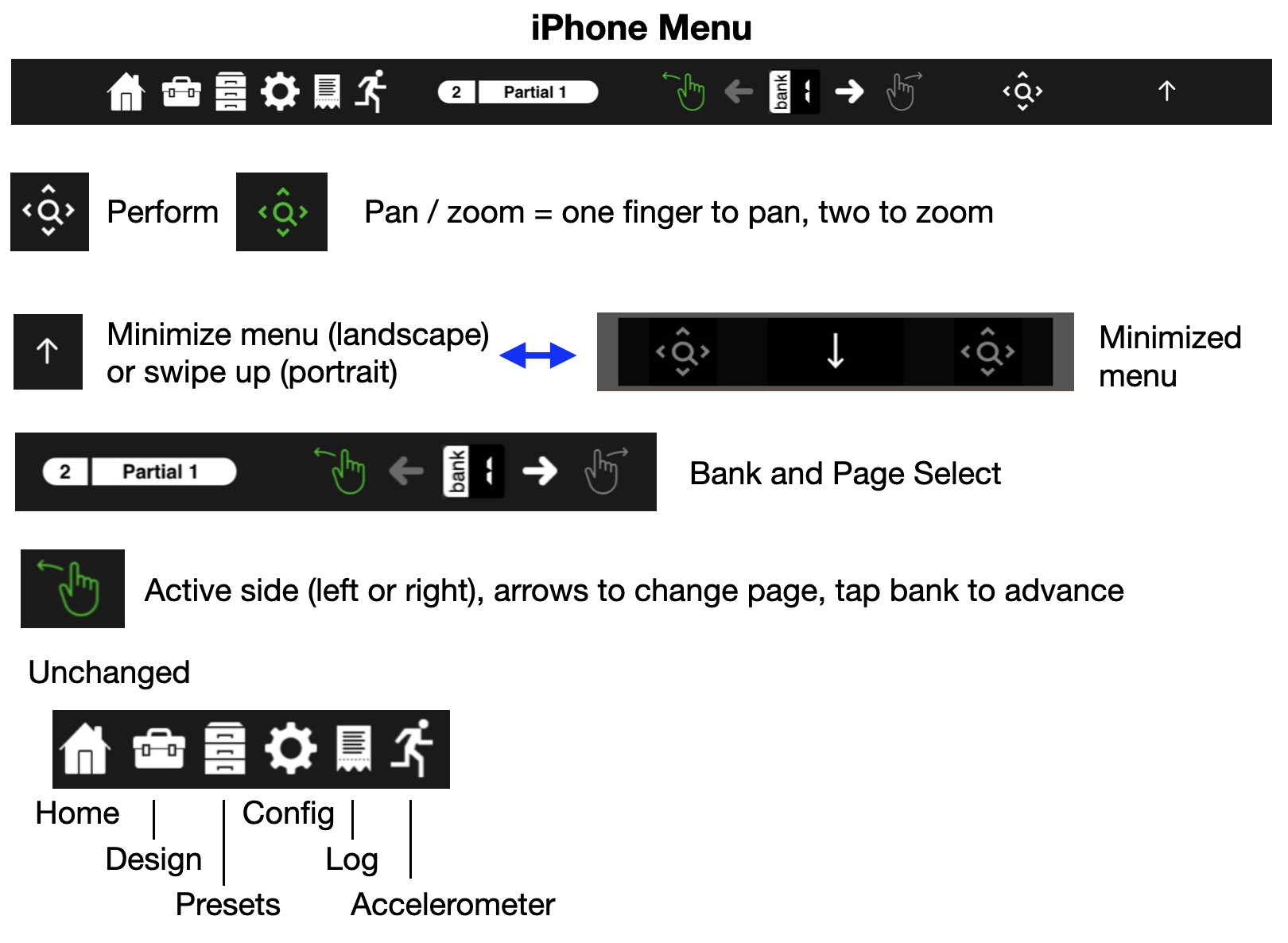
No more single page, iPhone now shows the same two page layout as iPad or Mac, portrait and landscape. At the top is the updated iPhone menu, which can be minimized for additional screen space.

iPhone Menu
- Hand icon (👆) selects the left or right page for control
- Selected page (left/right) hand is green,
- Left / Right arrows scroll selected page tabs, selected tab # and title shown to left
- Tap bank between scroll arrows to advance
- Hourglass icon <🔍> toggles between pan/zoom and perform
- Icon green, display ghosted = pan zoom. One finger to pan, two to zoom
- Icon white, perform
- Menu show / hide
- Tap up arrow (landscape) or swipe up to hide menu
- Minimized menu has pan / perform control
- Down arrow to restore
File Operations
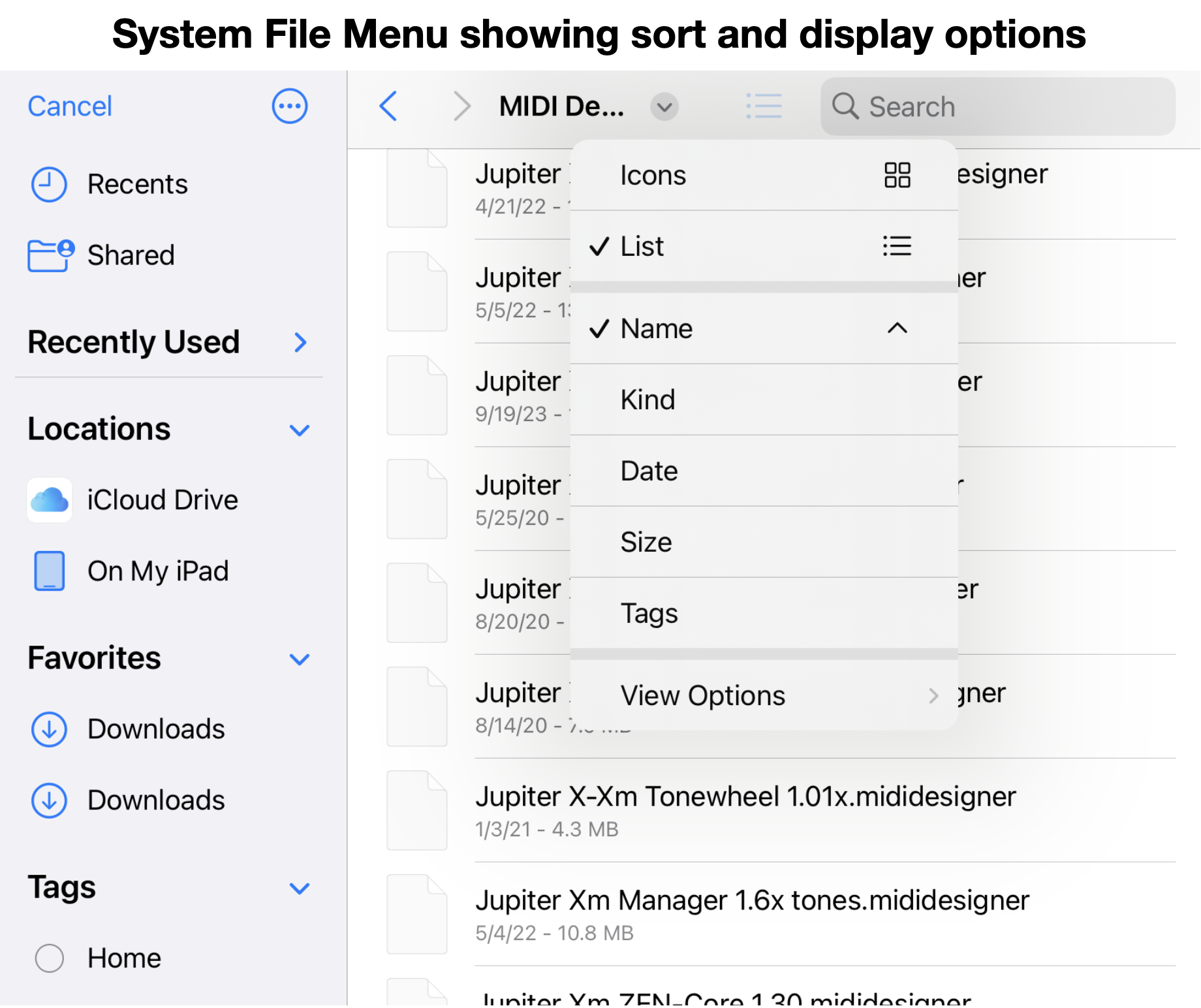
iPad & iPhone now use the system file menu
- Enables sorting, searching, display as list or icons, etc.
- Layouts can be saved and recalled from any folder
- Layouts (.mididesigner) can be opened by clicking filename in Files app
- iCloud is available (depending on your Apple account) - iCloud folders can be used to synchronize your layouts across all devices]
- Dropbox synchronization remains available on iPad & iPhone - only synchronizes the MIDI Designer folder
- Saved MD pages can be added to the current layout by clicking on the filename (.mididesignerpage)
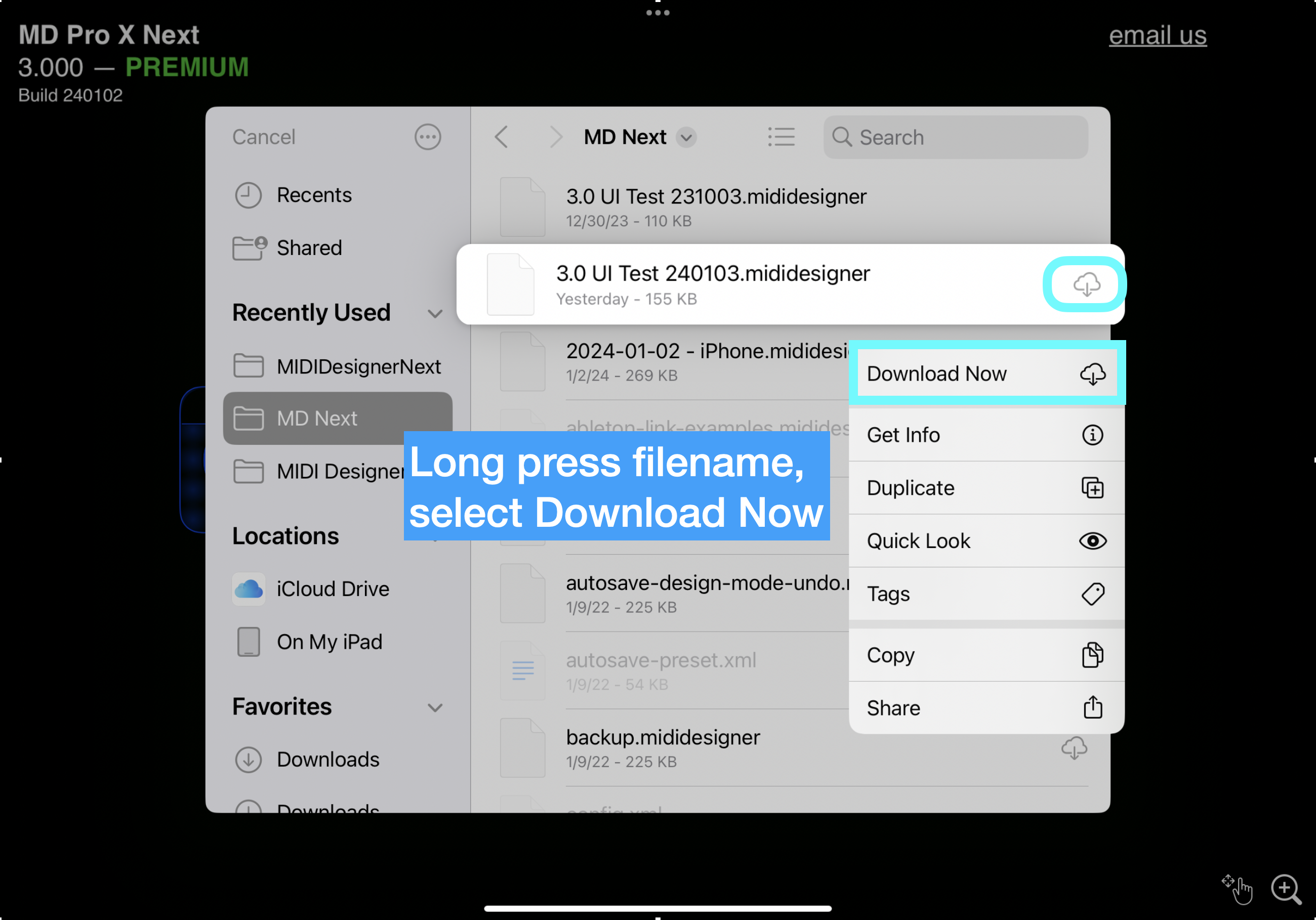
If an error is received opening a file on iCloud drive, ensure the file is downloaded. It should download when open is requested, but may generate an error message.
Display Version Options
MD now has new control display options:
- Three global templates - Classic, Glow, Spaceship (variant of Glow)
- Individual control elements can be set at Global or Individual Control level

Selectable individual display elements
- Handle *
- Numeric value (combined with handle on knobs)
- Tick lines
- Fill *
* You cannot turn off both handle and fill - one is required to indicate current value
When Glow is selected and handle / fill are turned off you get the new streamlined Spaceship controls.
Updating Global settings will overwrite individual control settings. Make a Global selection FIRST, then update individual displays as desired.

Other new features
Image Manager
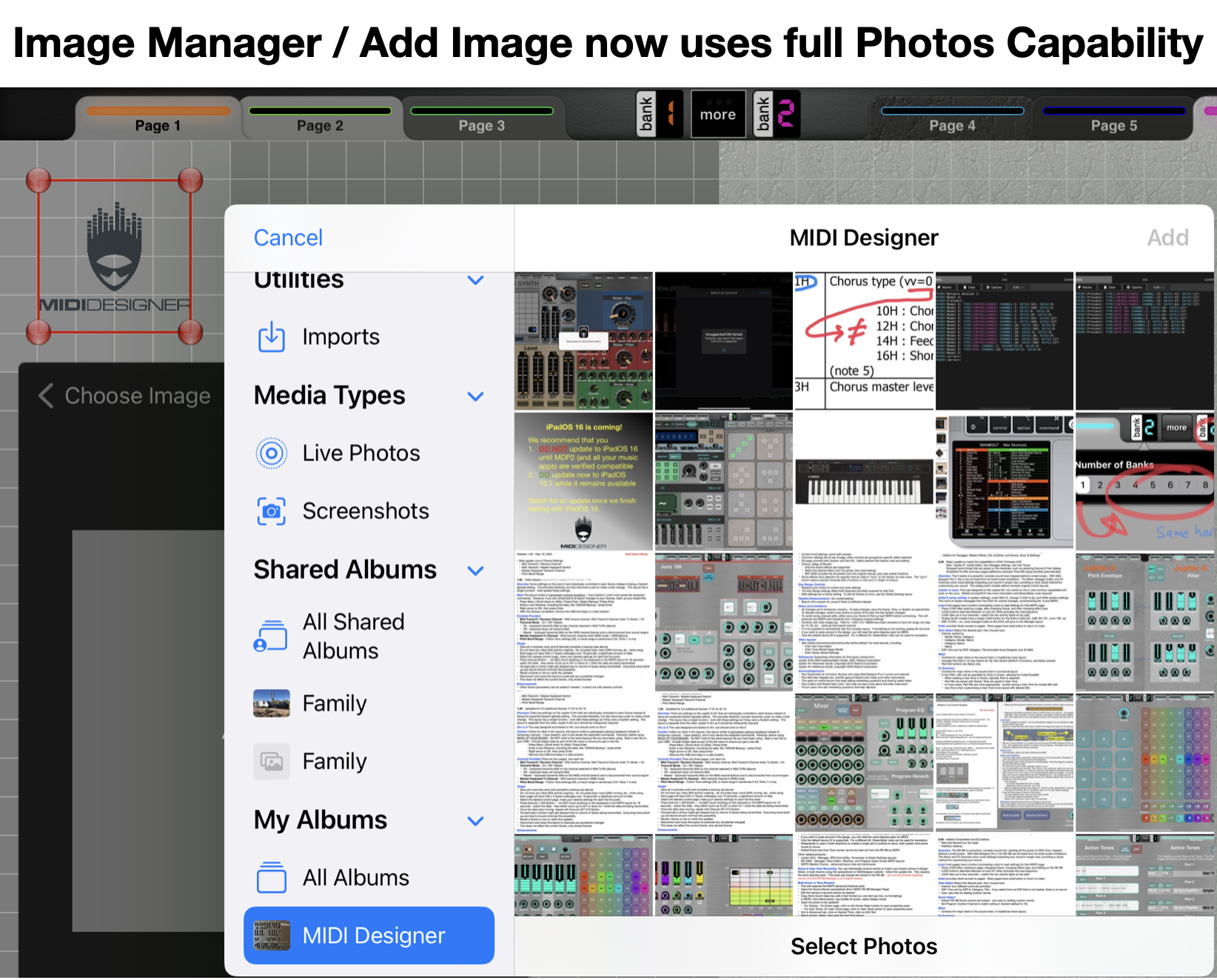
Image Manager - Import Image now uses full capability of Apple Photos app - search, folders, etc.
MD still brings images in via Photos, there is no direct import from file system.
Import should now respect image transparency.
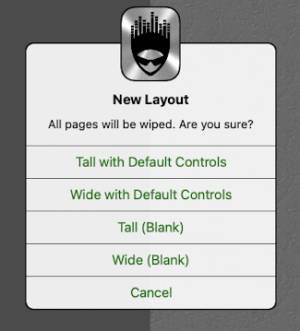
New Layout Sizes
iPad and Mac now provide Tall and Wide options for new layouts, with and without default controls,
- iPad - native device size
- Mac - 12.9“ iPad Pro size (2732-by-2048)
You can also change the current layout size
- Mac - File menu
- iPad / iPhone - Config - Actions
Note - if existing controls are “out of bounds” on the new layout, they will get put 'somewhere,' may have to get unstacked and moved. Save a copy before you change size.
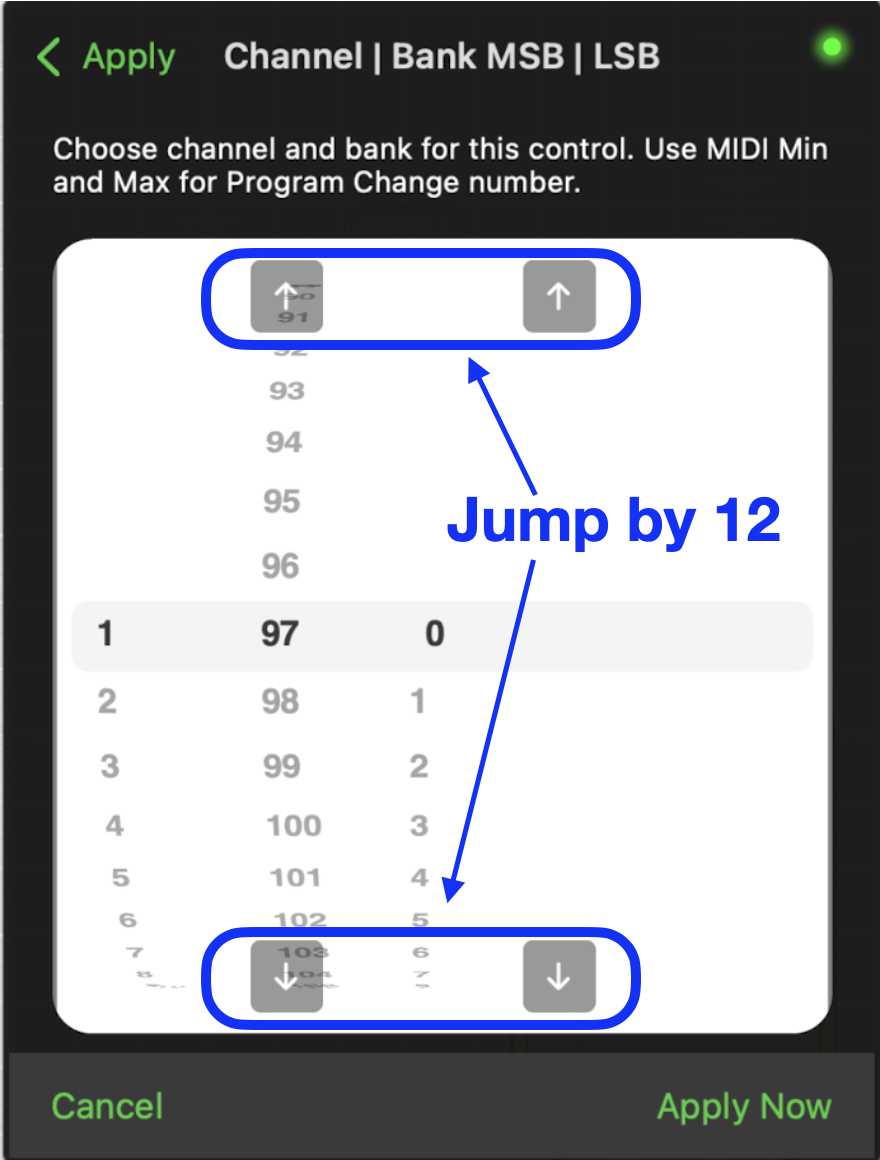
Picker Jump
In menu picker panels, the previous single-direction +10 buttons are replaced with + / - 12 value increment / decrement (jump) buttons.
Mac / Sandbox Access
Mac - can open Sandbox folder in Finder directly from menu (instead of copying file path)
Sandbox is the “working” folder used to store backups, local copies of included layouts, and other working data, typically MacHD - Users - Username - Library - Containers - MIDI Designer - Documents
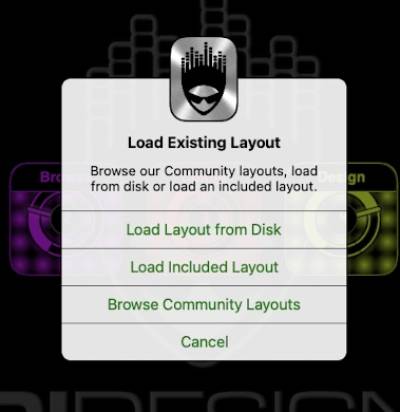
Changes to Load Layouts
On iPhone and iPad, the options have been split out like this

On Mac, the options are seen from File → Open
NOTE: When you select an included layout, a local copy is stored in
- Mac - Sandbox folder
- iPad / iPhone - MD folder
A copy is saved each time you use the “included layouts” option. Once loaded, use File / Open, then select the previously saved copy. Duplicates can be deleted.
New in 10.3.0
Custom LED Color - full control of LED color and opacity, by page and individual control
Highlight color (text color) - select text color for individual controls: Page, Black, White, LED, (buttons: always White)
Make Screenshots - automatically make screenshots of your layout
5-byte device ID Roland Sysex Checksum added to support new Roland devices
Premium users - simulate how layout looks for Free users.
Stream Byter delays of less than 1s are implemented
Stay Alive in Background will not silence other apps
manual/19_mdpx.1712677160.txt.gz · Last modified: (external edit)
Except where otherwise noted, content on this wiki is licensed under the following license: CC Attribution-Share Alike 4.0 International


