Table of Contents
Chapter 6: MIDI Properties
Changing the MIDI messages that MD sends is done by editing the MIDI Control Properties of each control. MIDI Designer supports all common types of MIDI messages. MIDI Implementation Chart
MIDI Properties of Controls
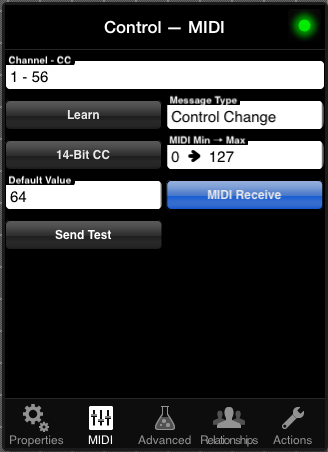
All functions described here are performed within the MIDI tab of the Control Properties Pane Double tap a control to access the Control Properties Pane, then select the MIDI tab.
Message Type
MD can send all common types of MIDI messages. Choose the Message Type by tapping on the Message Type box in the MIDI Properties. This brings up the Message Type Picker:

Most users only need two MIDI message types:
- Control Change: generally used to control parameters, like the amount of gain for a distortion effect. Absolute MIDI max is 127.
- Note On/Note Off: generally used to trigger notes on an instrument. Absolute MIDI max is 127.
MD also supports these types, discussed below:
- 7-bit (0-127 range)
- Control Change (CC)
- Note On/Note Off
- Note On/Note On
- NRPN (0-127)
- Program Change
- Channel Aftertouch
- Start/Stop
- Continue
- Song Position Pointer
- 14-bit (0-16K)
- 14-bit Control Change (CC)
- Bank Change
- NRPN (0-16K)
- Pitch Bend
- 0 to 4 bytes: Sysex
Learn Button (Toggle)
When set to ON (blue), MD listens for incoming MIDI data and assigns a MIDI message to the selected control.
Note: you must set the MIDI message type to the correct type before using Learn.
Send Test Button
Send the message of the selected control: this helps check that the MIDI message settings are correct.
Midi Receive Button (Toggle)
When ON: an incoming MIDI message in Play Mode changes the value of the selected control inside MD. When off incoming messages will be ignored.
Set to ON by default.
Default Value (all message types)
The Default Value changes the default value for a control. The Default Value is used in several places in Play Mode:
- Triple-tapping on any knob, slider, or crossfader will reset it to its default value.
- Config → MIDI → Reset to Default Values will cause all controls in the layout to reset to their default values.
- Buttons can also be set up to reset a page or the entire layout to its default value.
MIDI Min & Max
(Called MIDI Off & On for Buttons)
The MIDI Min & Max restricts the Min and Max values of a variable MIDI message.

Invert the Range
The Max can also be lower than the Min value, in which case the sent MIDI values range from higher to lower values.
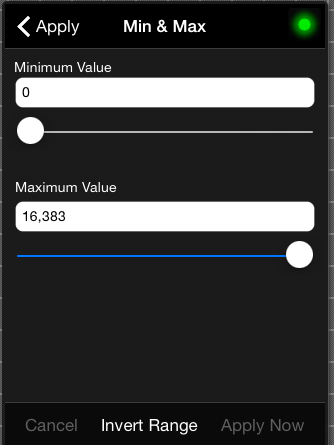
The “Invert Range” button will substitute the Max for the Min.
For 14-bit (2-byte) and More
A slightly different MIDI Min & Max pane is used for controls that allow for 14-bit values or more.
Notes on Each Message Type
Each message type has a slightly different set of parameters.
Control Change Message Type
CC Message Types send control change messages. MIDI Spec on CC Message
Channel / CC — This changes the Channel and CC (“Continuous Controller”) number the control sends and receives. Pressing the Unused button will only display CC numbers that are currently not being used in the layout.

14-bit Button (Toggle)
Infrequently, 14-bit CC's are required by MIDI targets for finer-grained MIDI messages
- The 14-bit Button is only available for controls that send use a CC of 0-31
- For more information on 14-bit control changes in MD, see here
Note On-Off / Note On-On
Normally used to send notes to trigger a sound source (e.g., a synth).
Notes can be used effectively for buttons and also knobs, sliders, and the like.
Channel and Note
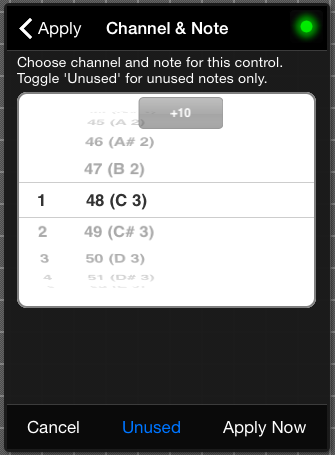
Adjust the Channel and Key Number for the MIDI message. Note that MD considers a C3 to be a 48.
Difference, Note-On-Off and Note-On-On
- The difference is mostly academic: For most MIDI targets, a Note-On with a velocity of zero is considered a Note Off.
- Note-On-Off will send a Note Off (e.g., 0x80 for Channel 1) when the value sent is zero, and a Note On-On will send a Note-On value zero when the value sent is zero (e.g., 0x90 for Channel 1).
- When the value is non-zero, a Note On is sent in both cases.
You can adjust some properties of all controls on a page. See Page-Wide Adjustments.
Bank Change & Program Change
- Bank and Program Change messages are often used to change patches on an external synth or a VST. Program changes only have an adjustable channel.
- Only the Channel may be adjusted for both Bank Change and Program Change.
NRPN & NRPN 14-Bit
- The MIDI parameters for NRPN – whether 7-bit or 14-bit – are Channel, MSB and LSB.
- NRPN 14-bit uses an extra three bytes to send “fine” value data: if your MIDI target understands NRPN 14-bit, this will add a degree of precision to MIDI
The MIDI Byte Calculator
Useful if you need to split a value over coarse and fine bytes. Generally, this is not necessary.
Sysex
Sysex (“System Exclusive”) messages are used by MIDI targets.
Advantages
Sysex messages are preferred by MIDI targets for a variety of reasons, including:
- Values may span several bytes (MD supports up to four), allowing for many possible values (128^number-of-bytes)
- Messages may be of practically any length (good for patch dumps, etc.)
- Messages may include a sysex manufacturer's ID and target ID
- Messages may include a checksum for error-correction
Characteristics and MD with Sysex
- Sysex messages are made of MIDI bytes (7-bit bytes which go up to 127, 7F in hex)
- MD allows for two variable values. One of these may span several up to four bytes.
- MD will automatically calculate several popular Sysex checksums
How to Use Sysex
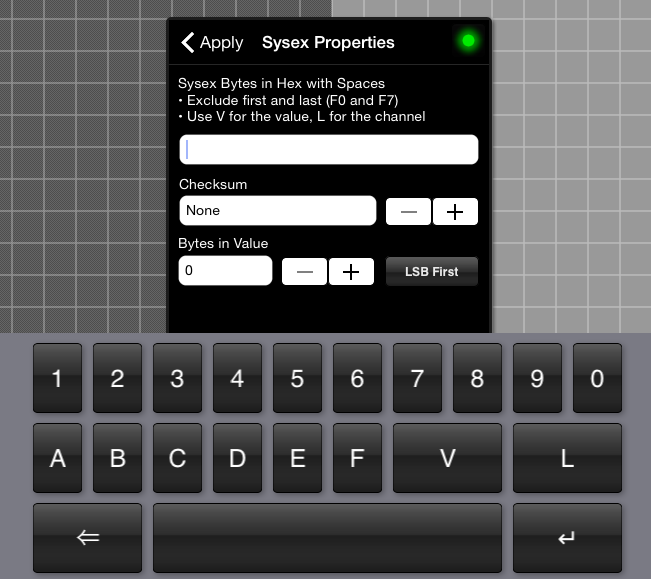
- Change any control's Message Type to sysex
- Tap on “Sysex Bytes in Hex”
- Type in your sysex bytes in hex
- The first and last bytes of a sysex string (F0 and F7) are already included by MD. You should not (and cannot) include these bytes.
The MIDI Byte Calculator Useful if you need to split a value over bytes. If your MIDI target is asking for you to enter a value that exceeds 127, this might help. However, Using V for Value will take care of this automatically.
Using V for Value
- If you use V in your sysex bytes, one or more bytes will have a variable value.
- You can choose 1 to 4 bytes for your MIDI message when you have a V in the sysex string.
- LSB first will reverse the order of the value bytes. This only affects controls that have 2 or more bytes in their value.
Using L for Channel
- Use channel in sysex string is the same as value. Use L for the channel.
- Channels may go up to 127 (one byte).
Channels for sysex are useful primarily with Channel Changers
Also, you can change the channel for an entire page of controls, including your sysex controls.
Getting Help with Message Types
Converting from Hex to Decimal
Use Google and prefix your number with 0x to indicate hexadecimal. For instance:
- Type this into Google: 0x44 in decimal
- Type this into Google: 0x7F in decimal
Converting from Decimal to Hex
- Type this into Google: 127 in hex
- Type this into Google: 44 in decimal
Other Conversions
Converting from 7-bit MIDI bytes to values, or from values to 7-bit MIDI bytes: try The MIDI Byte Calculator