MIDI DESIGNER
The only MIDI controller for iPad, iPhone, and Mac


Talk to other MIDI Designer users about MIDI Designer, iOS MIDI and related topics. Or share layouts, pages, and ideas.

Check out our Facebook Group.

Of course, if you want to send us an email, feel free.

Open problem reports

Summary of user requests
Can we have StreamByter sub-routines implemented? - MIDI Designer Q&A
0 votes
in Suggestions (Implemented) by the-elf (1.4k points)
recategorized by MIDI Designer Team (jkhiser)
The three issues with StreamByter (subroutines, Inject, and delays under one second) are already listed in the open problem reports listing, so would be redundant to add to the user requests list.

My latest layout would be simplified with subroutines.  I ended up "pretending" to do subroutine calls, setting up the memory locations properly, then repeatedly pasting the subroutine code inline.
I kept a count in my loop and based unique code on that count, while keeping common code at the end of each iteration. It looks awful, but avoids repetition. It made the coding a bit of a slog.

Fine as long as it is noted.
My current project (Tr 6s/8s) has a lot of unexpected algorithmic complexity, one of which is that it is the first device that enforces valid checksum, I have to modify addresses in SB logic, then fix the checksum.  This implies a lot of subroutine calls to do calculation.  As an alternative, I set a Fix_Checksum flag, then do it once at the end of the code.  This works for an input message, but not for a message I have to create.

One thing I discovered I had not used before is that the G array IS implemented, which eases passing data from input to output modules (but not stimulus).
Thanks for that insight. If you ever take a look at my code then I'd be happy to learn better ways to do things.
Thanks for the input. Info about variables From the MidiFire Manual below. I generally get confused working between hex and decimal values in StreamByter. Using $ before a number helps, but not always!

So I could use the "G" variable to pass common data between all SB modules. I hadn't consider that possibility. Of course it has to be properly initialized and maintained within the SBs.

Each StreamByter has its own set of four local variable arrays (prefixed by I, J, K and L) and there is one global variable array (prefixed by G) shared among all StreamByters per host app. These arrays each have 256 slots of unsigned 16 bit integers. A 'wide' array, prefixed by W, has 2048 slots of unsigned 16 bit integers. A 'precision' array, prefixed by P, has 256 slots of 32 bit signed integers.
The current MIDI message being processed is also addressed as an unsigned 8 bit array (max size 65536 bytes) prefixed by the letter M. Each variable letter is followed by a number (hex or decimal) that marks the position in the array starting from 0. Some examples:
L00        - local array L, 1st index
I2A        - local array I, 43rd index (hex)
I$43       - local array I, 43rd index (decimal)
G72        - global array G, 115th index (hex)
M03        - message byte number 4 (counting from 1)
M1234      - message byte number 4661 (sysex message!)
M$1234     - message byte number 1235 (using decmial)
I just noticed, M03 is hex, but M3 is equivalent and works.
You don't need a leading zero except on M0C, as MC is the message channel, not 13th byte of message.
OK, I am not familiar with M0C - so far
Beware M$08 and M$09 - SB throws an error on them!
Good catch, added to list of problem reports.
I saw that sub-routines are implemented in the new Beta. THANK YOU!!!

I've updated one of my Layouts to test the implementation, and all seems well. When the updated version makes it out into the wild I will re-release my Layout

2 Answers

0 votes
 
Best answer
Implemented in 10.2.0
by MIDI Designer Team (jkhiser)
selected by the-elf
0 votes

Use MidiFire StreamByter


StreamByter in MDP is a limited version of the MidiFire StreamByter. MidiFire SB accepts Subroutines and Defines. It is available in the app store and provides input and output interfaces with MDP and other virtual and physical devices for Control and Interface. It includes several Modules to facilitate MIDI routing, design, and programming. Contact me if you need help getting started. I have been using MidiFire for several years.

Attached is a view of my latest "Scene" for Midi Clock Control. and Display that I am currently working on finishing and publishing. Features iI includes are Midi Clock Input, Midi Tempo Control and Measured Display, and Beat Display. SBs are renamed StreamByter Modules. It includes an interface from an external Midi Clock Source, although the Dynamic Clock can be configured to provide the Clock Source within the iPad or Mac. It also provides programmed loopback capabilities.

https://audeonic.com/midifire/manual/#mod_byter

Copied from the manual:

Macros and Subroutines

Version 2.0 introduces two new code features; DEFINE and SUBROUTINE

The DEFINE rule lets you give any sequence of code tokens a name and then use that name further in the code instead of typing in the original text. This is similar to a #define in C but no parameters. Like the C version, you can have DEFINES that refer to previous DEFINES.

DEF[INE] <name> <some code>

It is essentially a find/replace. Best explained by example:

IF LOAD
  DEFINE MSG0 M0
  DEFINE CHAN_VOLUME B0 07
  DEFINE CHAN_VOLUME_MIN MSG0 == CHAN_VOLUME 00
END

IF CHAN_VOLUME_MIN
END

The SUBROUTINE rule allows you to create code subroutines (with arguments) that you can call from elsewhere in your code.

SUB[ROUTINE] <name> [<args>] ... lines of code ... END

Images
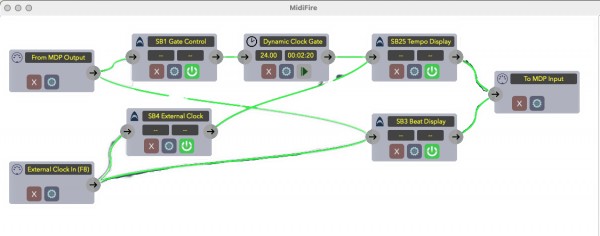
MIDI Fire Beats Tempo SB.png
by dsabou2062 (3.6k points)
edited by dsabou2062
Much appreciate the input. Thank you!

I do have the 'full' StreamByter on my iPad, but I've never used it. I'm not really comfortable having to implement virtual MIDI ports. The last thing I need is to break what I have right now!

Involving it would mean that MD Layouts would not be standalone - it would require users to both have the full SB, and install the SB code separately *and* make use of virtual MIDI ports (if I'm understanding its use correctly). That's a lot to take in for most 'casual' users.

Better, IMHO, if we can simply have an updated version of SB within MD. It's neat, standalone, and transparent to users.
I agree only partially. MidiFire offers more than just StreamByter. It is easy to configure and use with MDP. You won't know it is thereother then to activate it. See my post for a Metronome using StreamByter. https://mididesigner.com/qa/9825/metronome-hack-using-midifire-dynamic-clock?show=9825#q9825

The thing I worry about is it doesn't appear it is active anymore. It is out of date and I get no responses on Audionics forum. But as long as it is on Apple's app, it is what it is.
BTW, It is an invaluable troubleshooting tool. Using Event Monitors before and after an SB module in MidiFire is the best way to troubleshoot SB code even if it is to be used in MDP input and output rules.
Clever stuff.

I can't see a use for MF (or SB separate to MD) in my world. All I need to do is edit a few devices over MIDI. Everything else I can handle within MD, or in Cubase or Cantabile, including monitoring.
...