Roland GP- 8 guitar effect unit mididesigner layout: Welcome back in 1987 with a 2021 upgrade!Roland GP-8 YouTube info, just a small selection Roland GP-8 Roland GP-8 Roland GP-8 Roland GP-8 Etc. Roland GP-8 Mididesigner layout in action Info Roland GP-8 (source https://www.polynominal.com/site/studio/gear/fx/roland_gp8/index.html)
Guitar Effects Processor (1987) The GP-8 is a analog-digital hybrid multi-effect rackmount unit. GP signal Processor a big Roland-Boss commercial success and many units sold around the world.
|  |
 TECH the main control is a 8-bits HD6303RF CPU (part of Motorola MC6803) and the internal circuit design is based on several hybrid digital / analog technologies. TECH the main control is a 8-bits HD6303RF CPU (part of Motorola MC6803) and the internal circuit design is based on several hybrid digital / analog technologies.
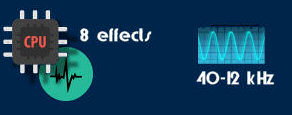 |
The internal frequency sample response is
from 40 to 12 kHz. |
 INTERFACE EDIT total lack of real-time knobs and many sub-menus. INTERFACE EDIT total lack of real-time knobs and many sub-menus.
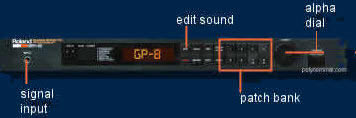 |  all effect edits are limited to a bunch of main parameters and no deep edit is possible. all effect edits are limited to a bunch of main parameters and no deep edit is possible. |
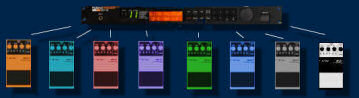
 EFFECTS unit offers 8 effects in fixed order, each of them can be partially edited or muted (bypass).GP8 EFFECT LIST: overdrive, distortion, compressor, dynamic filter, phaser, parametric EQ, digital delay and Chorus EFFECTS unit offers 8 effects in fixed order, each of them can be partially edited or muted (bypass).GP8 EFFECT LIST: overdrive, distortion, compressor, dynamic filter, phaser, parametric EQ, digital delay and Chorus
 | |
• Analog Overdrive simulates saturation, it should be a Turbo Overdrive equivalent.
Parameters: tone / distortion / turbo boost.
• Analog Distortion more a DS-1 rather than a SD-1.
Parameters: tone / distortion.
• Analog Compressor long sustain by cutting higher input and boosting lower input compression range from to -35dB.
Parameters: attack / sustain.• Analog Dynamic filter changes the filter cutoff frequency and produces a WAH effect similar to the T-Wah stompbox.
Parameters: sensibility/ cutoff / resonance / cutoff • Analog Phaser a bit like out-of-control but feeling is interesting mainly due to famous operational IR3109
Parameters: rate / depth / resonance. • Analog Equalizer basic 3 -bands EQ, precious fina final chain effects.
Parameters: HI / LOW / MID / LEVEL EQ.
• Digital delay up to 1000 ms time, 12 bits sampling resolution but system lacks a stereo panning effects.
Parameters: wet/ delay time/ feedback.
• Digital Chorus very good and somehow interesting
Parameters: rate/ depth/ wet / pre-delay / |
|
MIDI only 2 Midi CC# control changes are available: numbers CC80 & CC16 for expression purposes, same functions as Ev-5 pedal.
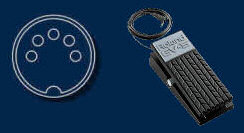 |  TECH: GP8 System handles Midi exclusives. TECH: GP8 System handles Midi exclusives. |
|
This was a highly successful guitar effect unit from the eighties with a great compressor, overdrive and distortion sounds, analogue EQ, phaser, auto wah and digital chorus and delay in a total 80’s sounding way. Up for grabs nowadays, with 128 storable presets, let’s say for 150 bucks or less!!!  From a guitar players point of view this a total sleeper unit: great sounds but inaccessible. No freakin knobs and guitar players do like knobs.
Why an editor/layout: it is a great unit but the turnoff is -and was- the lack of knobs and menus, a totally inaccessible unit. Pandora’s box for sure.( So if mididesigner would have been a standalone editor for the GP-8 only we would understand the need for MDP2 totally.)
Here comes the ta-daa: open up this box, wired or midi wireless with this MDP2 layout. For free, that is: buy MDP2 and the StreamByter plugin and of you go. And you should!!
Layout features:
- all parameters accessible from one screen;
- scroll through the presets ( top slider);
- get info button to read the actual data, this is filtered with show/ hide panels so you get the information filtered;
- add or change effects, be sure to update the patch info with the get info button;
- save your work (!) in your preset of choice with the lower slider and hit save!
Guitarist highlights:
- for guitar players get access to a truly analogue midi device that was sounding great but was inaccessible till now;
- the GP-8 is a classic guitar effect, but up for grabs because it was inaccessible;
- use you iPad, mididesigner (+StreamByter) and wireless midi device (CME, Yamaha md BT-01, Roland wireless midi) to control your roaring Marshall stack from 5 - 10 meters to get that sound right,
- set midichannel to 1;
- use the GP-8 in preset mode ( name preset visible, not the edit mode pressed on the unit);
- this layout is free! It is very useable (good) and could go commercial but I don’t want the burden of commercial obligations and besides that mididesigner pro and StreamByter should be bought as these guys are trailblazing pioneers for this amazing completion of older gear. A big hail to Dan and Nic for their great work! This layout could turn more guitar players to mididesigner, embracing old analogue technique through modern wireless devices. If a lot of GP-8 users should use this layout, the price of a retro GP-8 should definitely go up, the unit is THAT good!
Enough enthusiastic and fanatic blabbering on my part, have fun with this ‘key to Pandora’s box’ we call the Roland GP-8!
Cheers,
Gurbz


