MIDI Target Manufacturer(s): Roland
This initial release of JUPITER-Xmix for iPhone is focused on live performance functions for the Roland Jupiter-X and (especially) the Jupiter-Xm synthesizers. The Mixer section allows the user to adjust Levels, Mute and Panning for each of the 5 Parts, without menu diving or surface navigation. The Jupiter-X models support Bluetooth MIDI, so MDP2 is ideal for easily adding some additional controls to the synths.
By default, the layout best functions when the Xm System Settings have MIDI Basic Ch = 1 and MIDI Ctrl Channel = 16*. MIDI TX and MIDI RX settings on the synth should all be set to ON.
This layout may be updated with additional functions and improvements. It is intended as a predecessor to a larger JUPITER-Xedit layout for iPad in the future.
SCENE TOGGLE jumps between Scene Presets 16-01 and 16-02*. This can be useful for jumping between two similar Scenes with, for instance, different Tones for more variety during a single performance. MIDI Ctrl Channel should be 16*.
The FREQ PAD is an X/Y pad configured to simultaneously adjust Cutoff and Resonance for Part 1*, and by default snaps back to “0” over 1 second when released*. MIDI Basic Channel should be set to 1*, as this control uses CC rather than SysEx, where Part 1 = MIDI channel 1 (Part 2 is Ch 2, etc.). The BASIC CH dial is connected to this System setting.
SCENE LEVEL and PART LEVEL (and MUTE and PAN) controls should function independently of MIDI Basic and Ctrl Channel Settings on the synth.
*Indicates a layout setting that can be modified in MDP Design Mode
The JUPITER-Xmix MDP2 layout was created by Robert Saint John (@rsaintjohn on social media), and unassociated with Roland Corporation. Jupiter-X and Jupiter-Xm are trademarks of Roland Corporation, and no infringement is intended.
Images
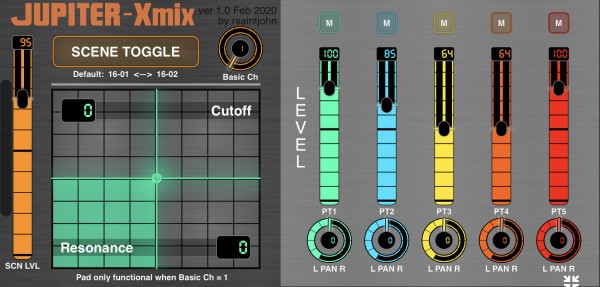 JUPITER-Xmix Main Screen (Live Mix)
 JUPITER-Xmix Notes Page


