MIDI Target Manufacturer(s): Original, Generic
I had done a very simplistic setlist manager a while ago (Setlist Manager), but a recent user question reminded me that it could be updated for more flexibility.
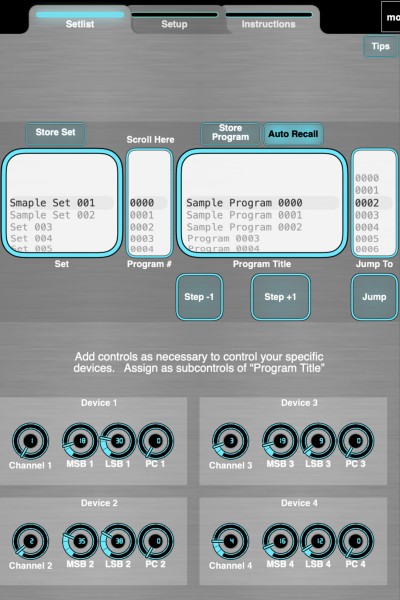
Flexible Setlist Manager
- Simple setlist manager for MIDI Designer
- Store programs that include settings for all your devices, plus optional jump destination
- Step through saved programs +/-, or jump to non-contiguous programs
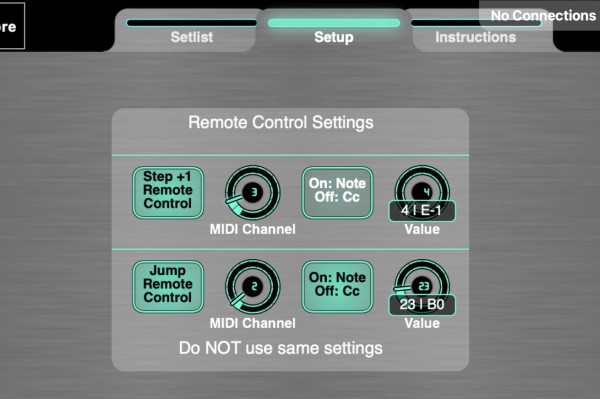
- Optional remote control of step+ and jump via Cc or Note
- "Set" picker provides shortcuts to specific programs
Add to your existing layout or use stand alone
- Layout has MIDI Channel, Bank MSB, Bank LSB, and Program Change for four devices
- Add or replace with controls necessary for your devices
- Controls should be assigned as subcontrols of “Program Title”
- If order of messages matters, adjust in “Program Title” relationships / subcontrols properties
To add to your layout, save then import the two pages, then copy StreamByter input rules
There is a bug in stepping -1 from program 002, bypasses 001 and rolls to 1024.
StreamByter handles two items - “flexible” remote controls and “jump”. If you hard-code the +/- controls and delete the jump functionality, SB is not needed.
To handle both the jump (relative) functionality and store program names & settings means we need both a traditional super/sub relationship and a preset relationship. This means the preset names are not functional for scrolling - you have to scroll in the program numbers picker.
If the relative jump is not needed, then the extra Program Numbers pickers is not needed - Program Names could then be enabled for scrolling.
===
Dan had asked a question a while back about "modules" that can be added to multiple layouts. This is two modules - the setlist manager, plus two instances of a module for flexible remote controls - to dynamically select a channel and cc or note for remote operation of a MD control.
There are two advanced "techniques" in this layout that may prove useful in other situations:
- programmable (or relative) jump for a control (in this case, we use an absolute program number for the jump target, but it can also work with relative values (+10 or -5, etc.)
- dynamic configuration of input controls (vs having to edit the layout to change the control settings)
Future: this functionality can be extended to a basic program "sequencer," with repeats, etc. Not a note sequencer, but you could sequence drum machine patterns, etc.
Images
 Flexible Setlist Manager
 Remote control settings


